
sábado, 23 de septiembre de 2017
Metric on Slashdot
I prefer the metric system, but sometimes it is just better to standarize what is going to be posted.


miércoles, 2 de agosto de 2017
La Maldición del Intelectualoide / La Maldicción de Hooke

Robert Hooke (1635-1703) fue un reconocido científico, genio, miembro de la Royal Society de Londres, sin embargo es infamemente recordado porque al final de su vida se quejaba de que él había inventado/descubierto prácticamente todo y que cualquier descubrimiento que hacía otro científico era simplemente una copia de su trabajo.
Posiblemente su pelea más clásica fue contra Sir Isaac Newton. Según Hooke el descubrimiento de Newton (Principia) era una copia derivada de sus estudios, lo cual nunca pudo demostrar, acrecentando aún más el descrédito que ya se había ganado Hooke. A lo mejor por eso cuando Isaac Newton fue presidente la "Sociedad Real" (1703) se "olvido" preservar el retrato (...y quien sabe más) de Robert Hooke.
Tenemos un extremo, cuando la ignorancia llega a niveles atrevidos y la gente cree en las brujas y en las aguas de sábila para curar el cancer ("ignorancia atrevida"). Y tenemos el otro extremo, cuando un intelectual a llegado al punto de que nada lo sorprende y de que todo lo nuevo es simplemente algo derivado del conocimiento infinito que posee. De intelectual pasa a "Intelectualoide".
Aquí marco la semejanza con el diccionario de la Real Academia de la Lengua Española. (Para yo mismo pasarme de Intelectualoide)

¿Acaso no es un Intelectualoide alguien que pretenda ser intelectual en todas la ciencias de la humanidad y tenga opinión sobre todo, aunque no sea área de estudio?
Posiblemente esto se ilustre muy bien en The Big Bang Theory. Cuando Sheldon Cooper le dice a Penny: "Soy un físico, se el funcionamiento de todo el universo y lo que contiene" y ella le pregunta "¿Quien es Radiohead?"
Recuerdo que en un curso de filosofía (en realidad recuerdo muy poco de ese curso) se discutía la República de Platón. En este curso el profesor, como su opinión personal, discrepaba con Platón con la idea de que un estado sea regido por intelectuales. Su argumento era que el intelectual puede tender fácilmente al narcisismo. Si, que macho el profesor al discrepar con Platón, pero sus palabras hacen sentido con lo que estoy escribiendo hoy.
He visto académicos convertidos a la política y sus resultados han sido desastrosos. Luego ellos culpan a "la mala cultura" o a "factores externos". Dicen cosas como: -"En Suiza si hubiera funcionado mi plan de trabajo". Pero la verdad es simple, ellos en teoría lo pueden todo, pero en la práctica nunca les ha salido nada.
Aunque Hooke-jovén fue un brillante científico, Hooke-de-edad-media pudo tener riqueza moderada y gozar con una buena reputación y prestigio, Hooke-viejo borró todo su esfuerzo de un plumazo. Hooke pasó la raya de intelectual a intelectualoide y ahora es recordado como el loco que se atrevió a decir que Newton le copio todo.
El Intelecualoide existe y puede ser igual de peligroso o peor que la "ignorancia atrevida". Lo más peligroso es que llegará de gente reconocida, así que no importa de quien venga la idea o el comentario (Hopkins, Obama, Varga Llosa) siempre es bueno pasarlo por algún filtro.
¿No sería buena esta frase para una entrevista de trabajo?
"En teoría lo puedo todo, pero en la práctica nunca me ha salido nada".
lunes, 19 de junio de 2017
The old Trackpoint Cap vs. the new Trackpoint Cap

For some weeks I started to sense that the Trackpoint on the my Thinkpad Yoga 14 started to get harder. I thought it most be something about the sensibility on the mouse settings to so I tweeked out.

It worked for a while, but in a month it became harder again. So I think something was wrong with the software, I checked the configuration and I set it to the "fastest" speed possible and it was still hard to move.
 |
| Low Profile Thinkpad Cap |
I was sad and nobody was able to soothe my burning heart, I thought it was a hardware issue with my Trackpoint, but as a last resource I though it should be a good idea to replace the Trackpoint cap. So I went ahead and order my replacement caps (which are the low-profile replacement caps, not the regular one, not the super low-profile and not the ultra low-profile cap. ).
 |
| It was kind of obvious that I needed to replace it. |
Once I changed the cap the Trackpoint started to move really fast without too much force, it was the solution to my problems. Now I'm happy and successful again.

You can see on the picture that the old Trackpoint is worn out and it is more flexible on the inner side than the new one. Maybe that is why the pushing the Trackpoint was harder on the old one and the new one was a breeze.
Lesson learn: Don't be dirty like me and change your Trackpoint more often.
Also remember: There are different kind of Trackpoint Caps size.
 |
| Regular Size Thinkpad Cap |
 |
| Low Profile Thinkpad Cap |
 |
| Super Low-Profile Thinkpad Cap |
 |
| Ultra Low-Profile Thinkpad Cap |
viernes, 2 de junio de 2017
Hardware: Lenovo Universal USB 3.0 to VGA/HDMI Adapter

Information
- Model No: AN9032D1
- ASM P/N: SC10H30055
- FRU P/N: 03X6959
- Support WebSite
Also known as "Lenovo USB 3.0 Dual Video Adapter". This is an adapter to include an extra USB monitor to your PC.
Drivers:
This adapter uses DisplayLink Technology, so you can get the driver from Support WebSite or you can get the driver from the DisplayLink site.Windows (Windows 10 - 1703 64bits)
I tried it out first on Windows. A new device will be show on Windows Device Manager called "Lenovo U3 to VGA HDMI Adapter". It will run with the DisplayLink drivers.
After that with the "Win+P" combination you can extend the desktop without issues.
So, here goes the question. What can happen if you connect a monitor the HDMI port and also a different monitor to the VGA port ??
The result is very good. You can have two extra monitors on your computer. Both ports works for independent monitors.


Android -7.0 and 6.0.1
This device is not formally supported under Android by Lenovo, but I checked that DisplayLink has an Android driver (an app on Google Play). I tried it out with one port of the device (any port but only one at the time) and it worked.I tried it with my Moto G4 plus and a Samsung device and it worked to put your display video on a external monitor.

You need to play a little but with the "DisplayLink Presenter" app until it tells you "Start now" and you screen will be casted via USB.
Images


martes, 16 de mayo de 2017
Hardware: Lenovo Thinkpad OneLink+

Information
- Lenovo Thinkpad OneLink+ : 40A40090US
- Model Number: DU9047S1
- ASM PN: SD20H13054
- FRU PN: 03X6296
- MT: 40A4
- Support Site
- Shop Site

Windows 10 - 1607 - 64bits
- Lenovo Drivers : v11016 - 9 Sept 2016.- DisplayLink Drivers (Manufacturer) - 31 Mar 2017
Ethernet Port:
The ethernet port of the device is recognized as "Thinkpad OneDock Plus Ethernet":Windows Hardware ID: USB\VID_17EF&PID_3054&REV_3001
Hardware ID: 17EF:3054
It has a Realtek chipset.

Also it see it as an USB-Ethernet device.

Display Ports:
It has one VGA and two Display ports on the back. Lenovo has a great matrix of the supported resolution of the dock according to how many monitors you are plugging to it.It is important to say that this dock does not has "DisplayLink" technology like a similar Thinkpad USB dock. This one depends on your installed Video chipset.


Audio:
It is recognized as "Thinkpad OneLink Plus Dock Audio".Windows HardwareID: USB\VID_17EF&PID_3055&REV_0109&MI_00
HardwareID: 17EF:3055
It seems to use a C-Media chipset.

This seem to be also an USB Audio device.

USB
The Dock has 4 USB 3.0 ports, one of those has the battery logo and it is yellow. You can charge your phone on that "battery port" even is the laptop is disconnected from the dock.
There are other two ports that are USB 2.0.

On my Thinkpad, the OneLink USB port shows like the USB Port 14 and Port 3.
Here it connects all the USB ports of the dock.

And it seems the recognized a Port 3 is also part of the dock.

Little Utility
The Lenovo drivers also installs a little utility with Windows shortcuts to the video, audio, usb and network settings.
Power Adapter
- Model: ADLX90NDC2A
- LC PN: 36200285
- LI-PN: 45N0243
- FRU: 45N0481
- Input: 100-240V-1.5A 50-60Hz
- Output: 20V - 4,5 A


 |
| Trying to plug as much as possible to test |
martes, 18 de abril de 2017
Sony's TV Android 6 nasty bug - TV won't turn on.

Update March 2017: The bug has been fixed after almost after four months of having this nasty bug on your TV (Fix: 4/18/2017 Version PKG3.865.0136NA). Some countries (like mine) does not haven an update yet.
Sony updated some TV's to Android 6.0 on mid-December of 2016. This update introduced a bug on some TV's. The TV will no longer turn on (quickly) after a period of time that it is turned off.
Symptom: The TV won't turn on with the remote's power button. On my case the bottom light of the TV will remain in color yellow, and the power buttons just remain unresponsive. After 4 minutes of waiting the light will turn off and the TV will restart complete showing the Android boot animation logo.
It is very annoying since you can not quickly turn on your TV.
Sony's Support: Sony support may suggestion your two things:
1) To make a factory reset of the TV. With this the TV will work fine for a week and after that the bug will show up again.
2) They may change your mainboard, but when it get updated again to version 6.0, the bug will show up again.
Cause: Complaining around on the Sony forum some user found which component may be the issue of the bug. If you turn off the Wifi of the TV, the bug will not show. At the same time it will cripple the TV since wifi it is very important, but it is very interesting that the possible cause of the issue was found.
Affected Models: For the moment this are the affected models reported on the forum:
- KDL-50W800C - SVPDTV15_UC-user 6.0.1 MMB29V.S4.3.709 release-keys.
- KDL-50W805C
- KDL-50W809C - 6.0.1 - PKG3.707.0120BRA - SVPDTV15_BR-user 6.0.1 MMB29V.S3 3.707 release-keys.
- KDL-55W800C - PKG3.709.0120NAA
- KDL-55W808C
- KDL-65W850C
- KDL-75W850C
- XBR-55X850C
- XBR-55X850D
Sony told on the forum that the bug has been recognized, but it haven't post a fix for the issue in four months.
Links:
Sony Forum US -martes, 4 de abril de 2017
The OneLink and the Onelink+ Dock Ports
It seems that someone missed to tell this to the Internet. Some Lenovo Thinkpad computers has a dock port call OneLink and it was upgraded to the OneLink+.
Even that it seems that both ports are compatible, they are also different.
OneLink Port
The OneLink Port (female) has protective plastic cap. Here goes some pictures of the Lenovo Thinkpad OneLink port: |
| OneLink Port - Male |
 |
| OneLink port - Female with Cap |
 |
| OneLink port - Female with Cap |
 |
| OneLink Port - Female - No Cap |
OneLink+ Port
Here goes some pictures of the Lenovo Thinkpad OneLink+ port. Please notice the difference. |
| OneLink+ Port Male |
 |
| OneLink+ Port Female |
 | |
| OneLink+ Female Port on Thinkpad |
 |
| OneLink+ Female Port on Thinkpad |
Some cables and devices for the OneLink port.
 |
| Part Number: 4X90G85927 |
 |
| ThinkPad OneLink Dock Part number:4X10A06077 |
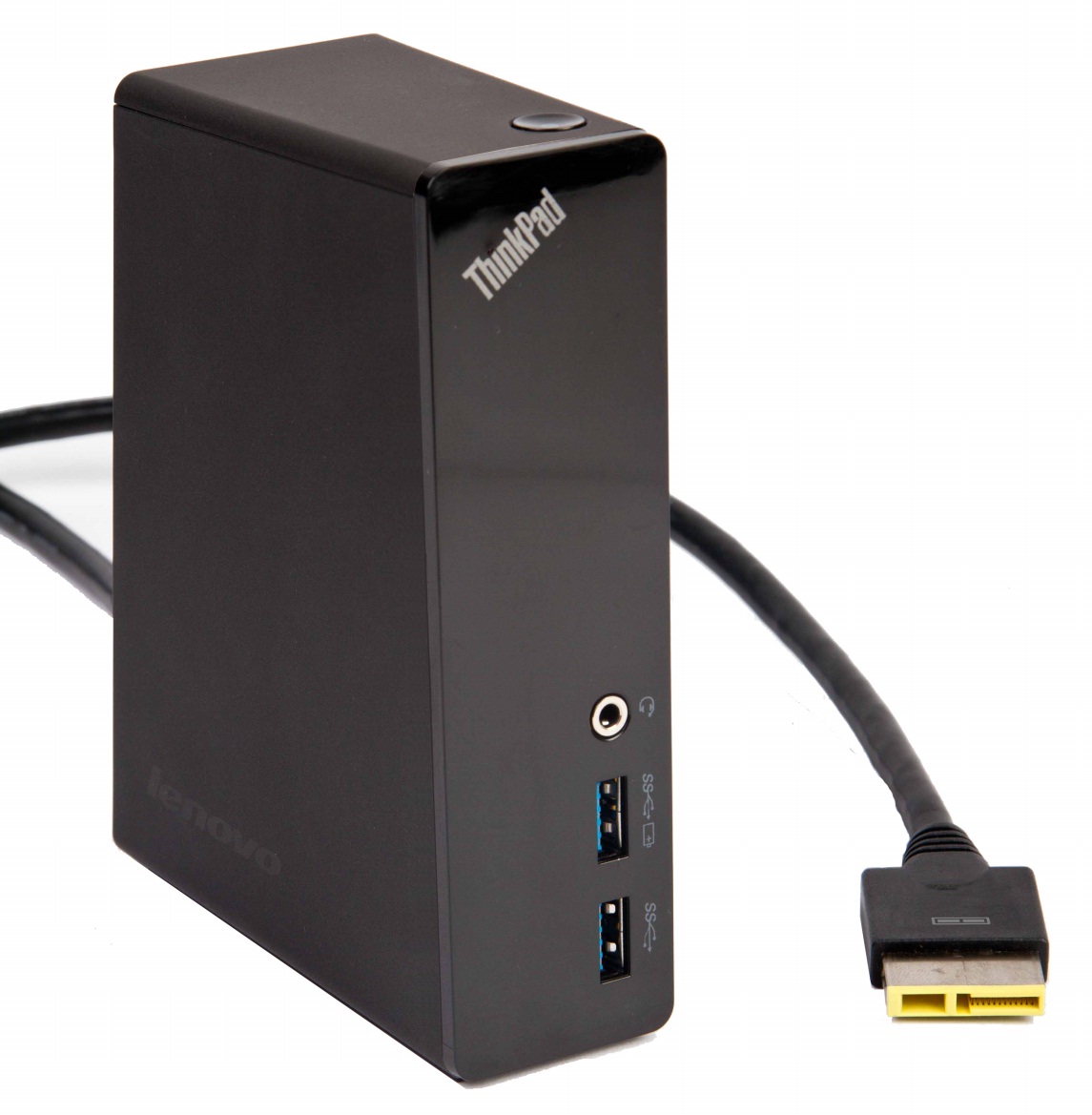 |
Some cables and devices for the OneLink+ port.
 |
| ThinkPad OneLink+ to VGA/RJ45 Adapter |
 |
| ThinkPad OneLink + Dock Part number:40A40090US |
 | ||
| Part Number: 4X90K06975 |
Feedback
Any more technical detail and description of both ports that can be public is welcome.
Suscribirse a:
Entradas (Atom)